The family mental load, finally out of your head.
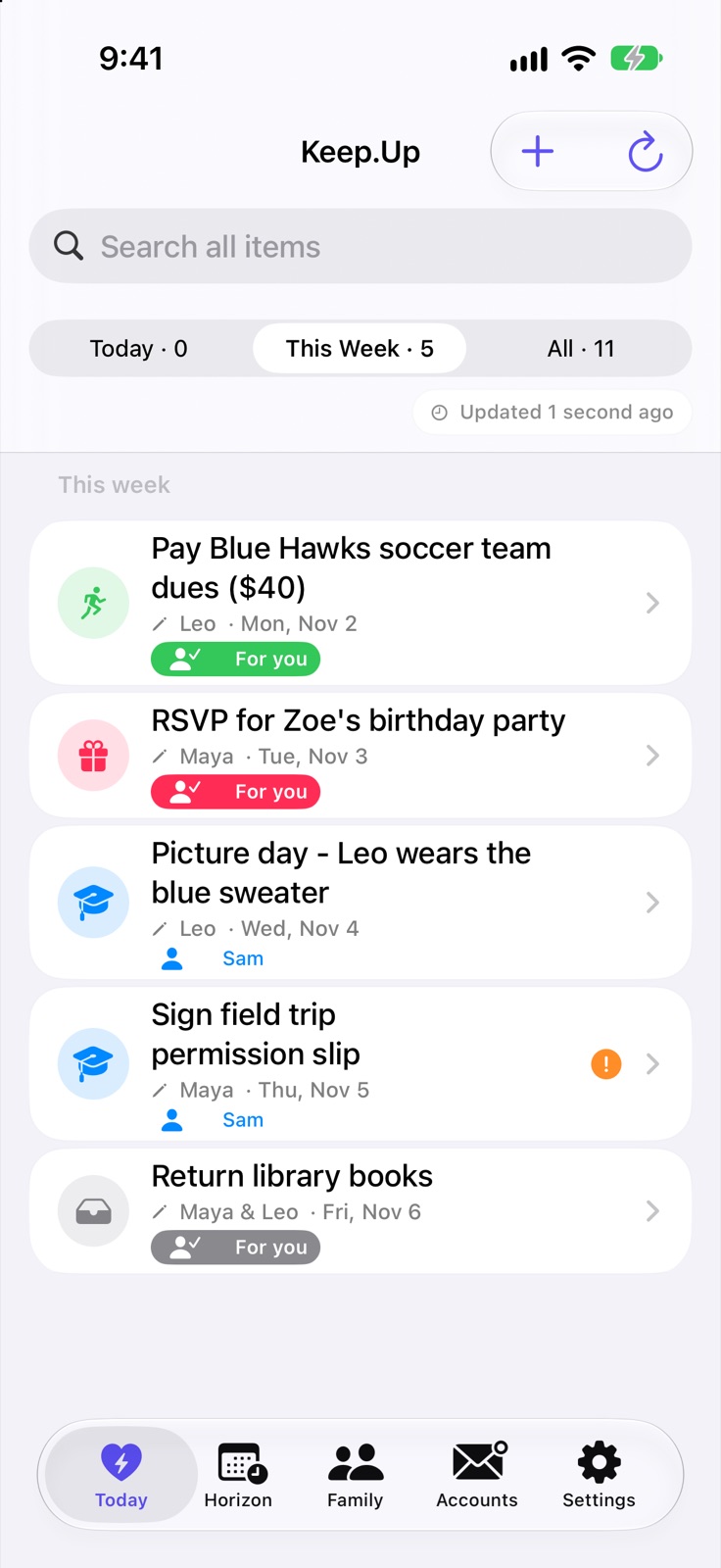
Keep.Up finds your family and school emails and surfaces action items — birthdays, forms, registration deadlines, RSVPs — and lets you assign each one to a person. So it's not all on you.

No ads. Ever. · Private by design · Your items stay on your devices, and in your family's iCloud once you share
Works with Gmail · iPhone and iPad on iOS 26 or later · Works best with Apple Intelligence
Outside the US, not on iPhone or iPad, or just want to hear what's new? Join the updates list. Occasional emails, no spam.
You're in — we'll send a quick welcome to your inbox. No confirmation needed.
You're the one who remembers everything.
The dentist. The field-trip form buried in email #14. The birthday gift. The camp deadline. That list lives in your head — and it never sleeps. Keep.Up makes it visible, and shareable.
How Keep.Up works
Connect your family inboxes
Securely link the Google accounts where school, camp, and activity emails land. Setup takes a minute.
It surfaces what matters
Keep.Up finds the signal in the noise and surfaces the real action items — forms to sign, deadlines, RSVPs, birthdays — with dates.
Assign it and share the load
Give each item to a person. The whole household sees who's got what. No more "I thought you did it."
📥 Finds what matters in your inbox
Stop digging through 40 school emails to find the one form that's due Friday.
👪 Built for the whole household
One shared view, items assigned to real people. Responsibility leaves one person's shoulders.
🔒 Private by design
Native to iPhone and iPad. Your items stay on your devices. Once you share with family, they are also kept in your family's iCloud. Never sold, never mined.
⏰ Gets ahead of the deadline
Nudges you before the window closes — not after your kid missed the cutoff.
Meet the maker
Keep.Up is built by Jeremy Taylor, a child psychologist and dad to a busy tween, who is also a solo developer and the founder of Little Dove Dev LLC. It started as one family's problem with school email: he and his wife know firsthand how hard it is to keep up with the deadlines, newsletters and emails that come with being a parent today, so he built a tool to help families like theirs.
“I built Keep.Up because keeping up is hard. It has helped my family, and I hope it helps yours too.” — Jeremy
Questions
Does Keep.Up cost anything?
Keep.Up is a free download, and everything in it comes with Keep.Up+. Keep.Up+ starts with a 7-day free trial for new subscribers, then it’s $6.99 a month. The trial turns into a paid subscription that renews automatically. To stop it, cancel at least 24 hours before the trial or the current month ends. You can manage or cancel it anytime in your Apple Account settings. Without Keep.Up+, the app is locked after setup. The free trial counts as Keep.Up+. Even when the app is locked, Disconnect Google and Delete all my data always work. One subscription covers everyone in your Apple Family Sharing group (up to 6 people). Someone outside that group, such as a co-parent in another household, needs their own.
Which devices and iOS versions are supported?
Keep.Up supports iPhone running iOS 26 or later and iPad running iPadOS 26 or later.
How do I install Keep.Up?
Download Keep.Up from the App Store: Keep.Up: Family Deadline Radar. It's available for iPhone and iPad in the United States.
Does Keep.Up work with Outlook, iCloud Mail or other email?
Not today. Keep.Up scans Gmail only. You can still add items by hand, or send them to Keep.Up from other apps with the Share button.
Do I need Apple Intelligence?
No, but Keep.Up works best with it. When Apple Intelligence is on and ready, Apple’s on-device model scans your mail. When it isn’t, simpler keyword rules scan it instead. Those rules also run on your device, but they tend to add more items that aren’t real to-dos, and some that are already past due.
Apple Intelligence needs an iPhone 15 Pro or newer, or an iPad with an M1 or A17 Pro chip or newer. On iOS 26 you turn it on in the Settings app, under Apple Intelligence & Siri. On iOS 27 it comes with the update, as long as your device and Siri are set to the same supported language. Either way, Apple’s model can take a while to download.
Each device scans the mail of the accounts connected on it. So if you share with family, items from a device without Apple Intelligence come from the simpler rules, and they reach everyone’s list.
Is my email private?
Your email is scanned on your device: by Apple's on-device model when Apple Intelligence is on, and otherwise by simpler keyword rules. There is no third-party AI and no server-side inbox scraping. Google access is read-only. Shared family data syncs through iCloud, where Little Dove Dev cannot read it.
Full details are in the privacy policy.
How do I connect or disconnect my Google account?
Inside Keep.Up, open the Accounts tab. Tap Add Google account to connect one. To disconnect one, swipe left on it and tap Remove. If Keep.Up is locked, tap Disconnect Google on the lock screen instead. You can also revoke Keep.Up's access anytime at myaccount.google.com/permissions.
More answers, and how to reach us, on the support page.
Keep.Up is on the App Store
It's a free download for iPhone and iPad on the US App Store, and everything in it comes with Keep.Up+. Keep.Up+ starts with a 7-day free trial for new subscribers, then it's $6.99 a month. The trial turns into a paid subscription that renews automatically. To stop it, cancel in your Apple Account settings at least 24 hours before the trial or the current month ends. One subscription covers up to 6 people in your Apple family.